Auto-exempt new companies from Credit Limit enforcement
Minor Upgrade
❗ Important: This feature is currently in Early Availability (EA). For more information on feature status, see Product lifecycle phases.
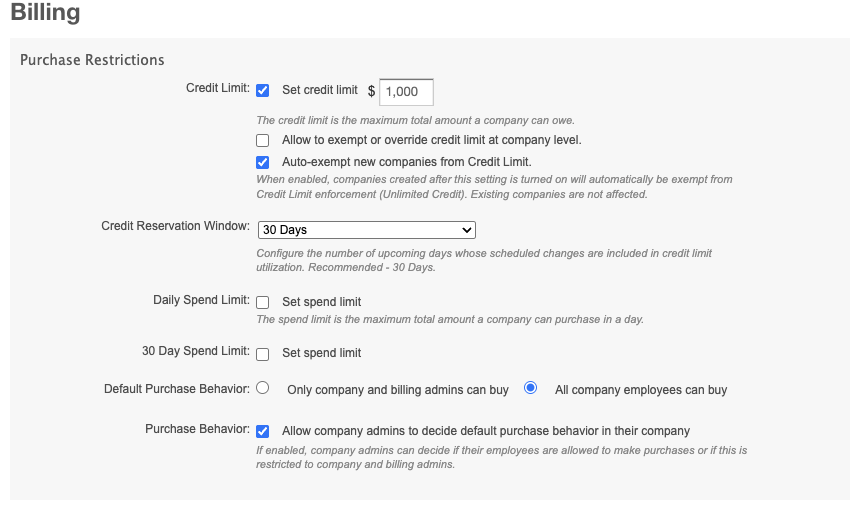
When Credit Limit is enabled, every new company is assigned the marketplace default credit limit. Marketplace Managers can now use a marketplace-level setting to automatically exempt newly created companies from Credit Limit enforcement, so new companies are not subject to credit limit validation at setup. This helps partners onboarding companies in bulk without having to update credit settings for each company individually.
Key highlights
- A new setting lets Marketplace Managers automatically exempt new companies from Credit Limit enforcement.
- When enabled, every company created after the setting is turned on receives the same treatment as the per-company exempt credit override at creation.
- Previously, managers could exempt companies one at a time. This setting applies a blanket exemption for all newly created companies.
- Exempt companies are not subject to credit limit validation and rely on direct payment methods such as credit cards, debit cards, or offline bank transfers.
- The setting applies only to companies created after it is enabled. Existing companies are not changed.
- Marketplace Managers can still update credit settings for individual companies at any time.
- The setting applies across all company creation paths, including UI signup, CSR create, public API, partner integrations, migration import, and reseller-led creation.
- Changes to the setting are recorded in the audit log.
UI updates
A new option is available under Settings > Billing Functionality > Auto-exempt new companies from Credit Limit.
Known limitations
- Bulk apply auto-exempt to existing companies is not supported.
- Per-segment, per-tier, or per-channel default rules at company creation are not supported.
- Time-bound exemptions (for example, auto-enforce after a set number of days) are not supported.
- Disabling Credit Limit automatically resets the auto-exempt setting to OFF.
Feature enablement
This feature is not enabled by default. Contact your AppDirect technical representative to request it.
Setting enablement
Credit Limit must already be enabled on the marketplace.
Go to Settings > Billing Functionality > Purchase Restrictions > Credit limit and enable Credit Limit.
Documentation
Refert to the following:
- See Auto-exempt new companies from Credit Limit section in Credit limit
- Configure purchase restrictions
- Configure company-level spend limits and credit limits
- High-risk settings
Was this page helpful?
Tell us more…
Help us improve our content. Responses are anonymous.
Thanks
We appreciate your feedback!